
Channels
Here you can manage NewAPI's upstream Channels.
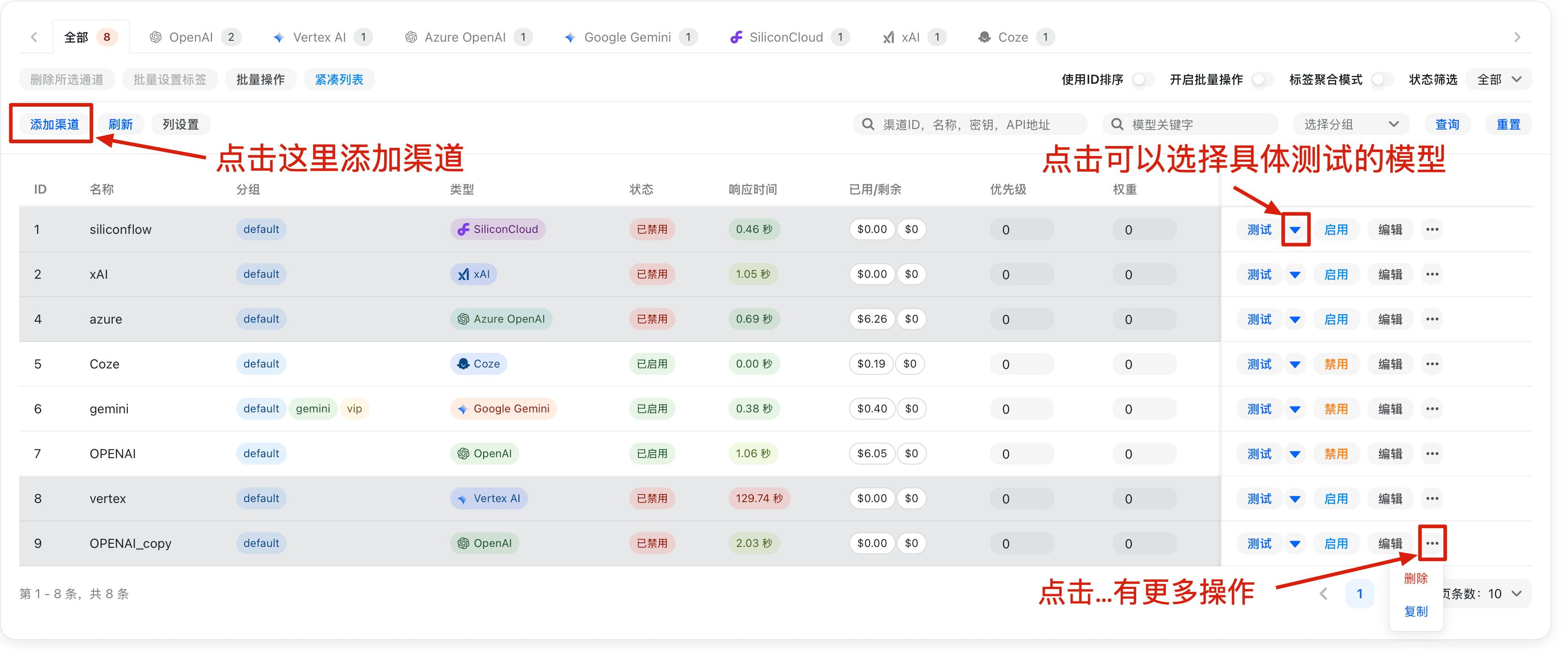
Channel Creation/Editing Page
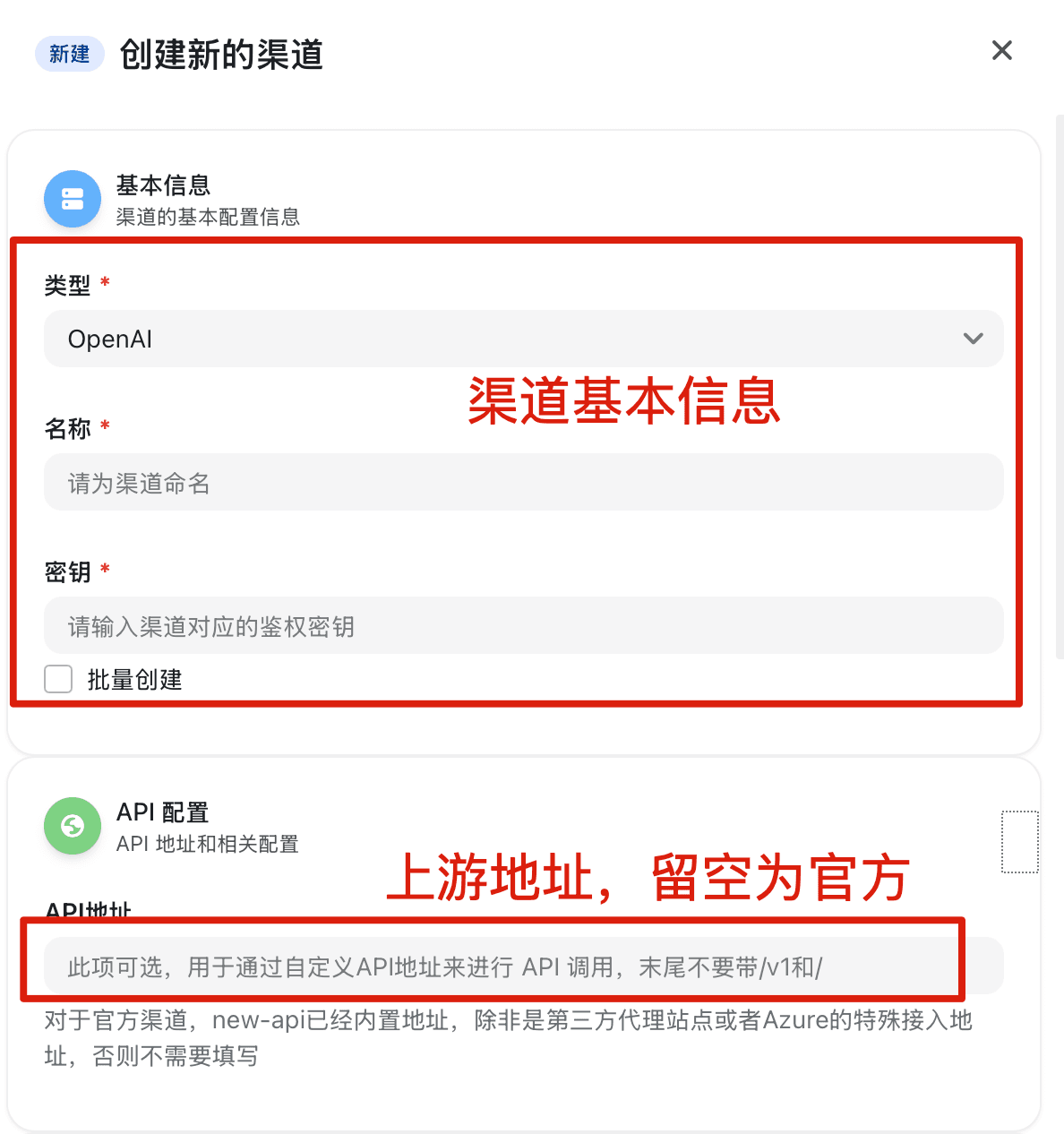
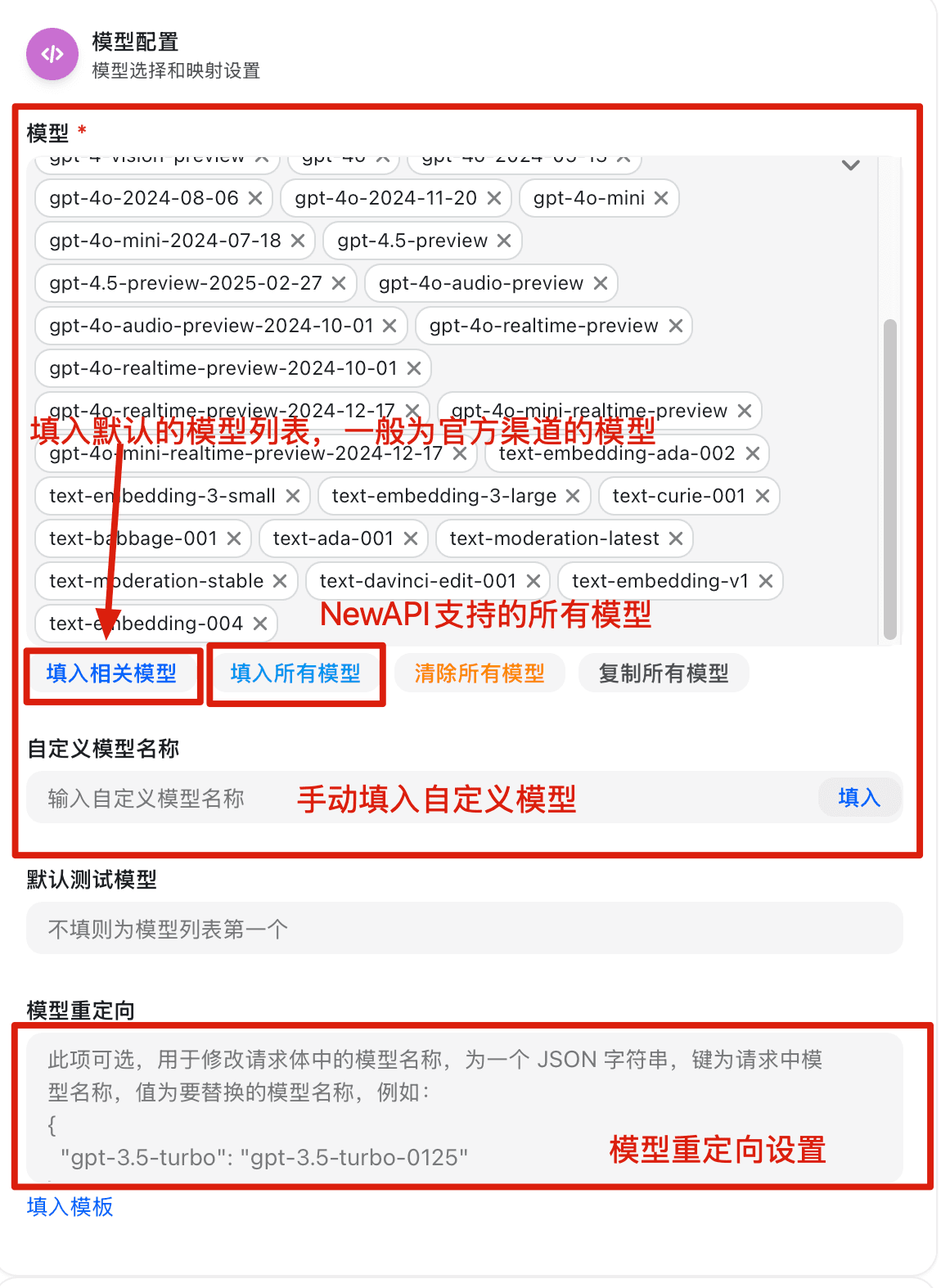
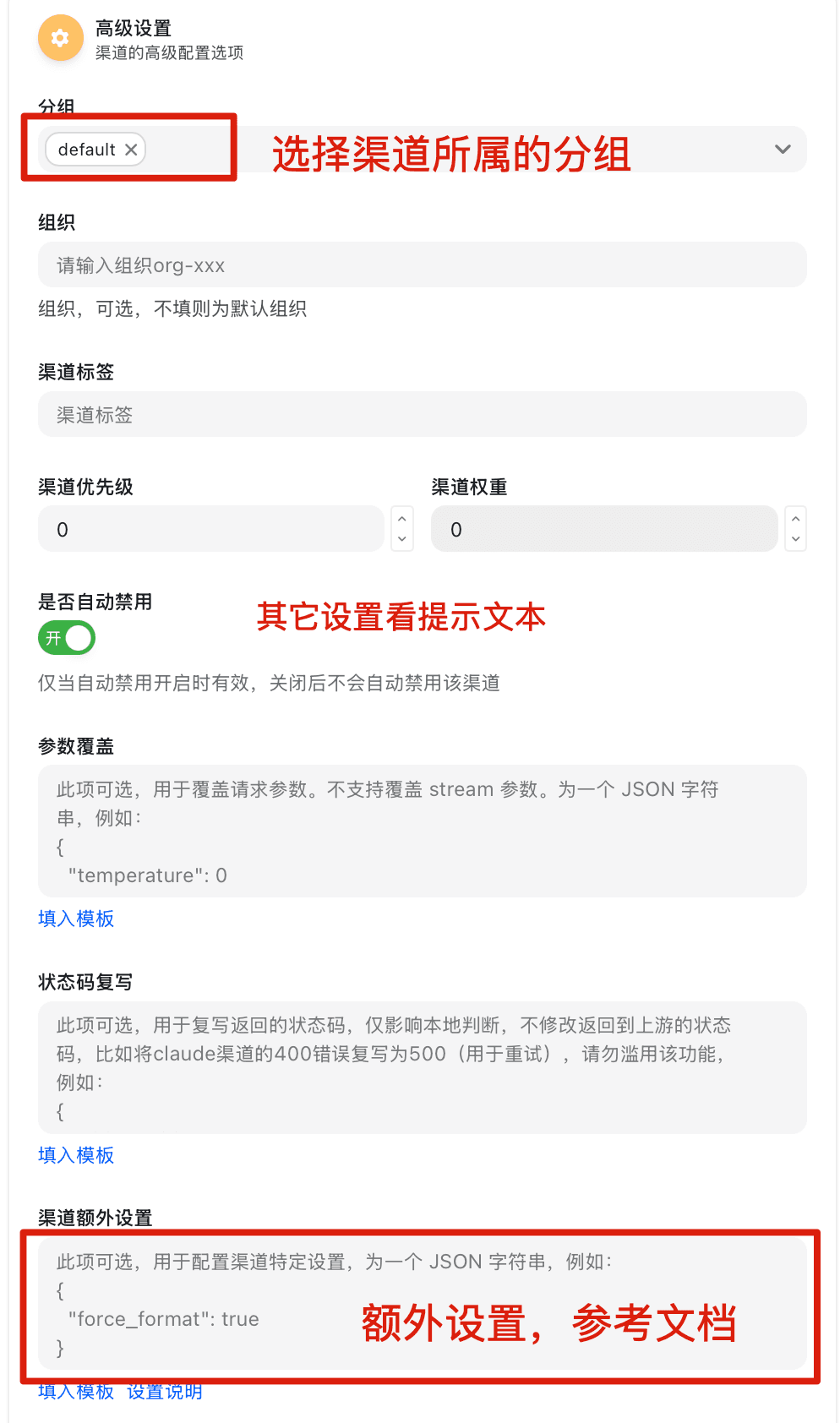
Parameter Override Settings Documentation
Overview
The parameter override system supports two modes: simple override mode (backward compatible) and advanced operation mode. Complex dynamic parameter adjustments can be achieved through flexible conditional judgments and operation types.
Usage
Simple Override Mode
Backward compatible, directly specify the fields and values to be overridden, and the system will merge these fields into the original request.
{
  "temperature": 0.8,
  "max_tokens": 2000,
  "model": "gpt-4"
}
Advanced Operation Mode
Define complex parameter operations through the operations array, supporting advanced features such as conditional judgments, array operations, string concatenation, and string normalization.
Basic Structure
{
  "operations": [
    {
      "path": "temperature",
      "mode": "set",
      "value": 0.8,
      "conditions": [...],
      "logic": "AND"
    }
  ]
}
Field Description (fill as needed):
mode: Requiredpath: Applicable toset/delete/append/prepend/trim_prefix/trim_suffix/ensure_prefix/ensure_suffix/trim_space/to_lower/to_upper/replace/regex_replacevalue: Commonly used inset/append/prepend/trim_prefix/trim_suffix/ensure_prefix/ensure_suffixfrom/to: Applicable tomove/copy/replace/regex_replacekeep_origin: Used forset(skips if value already exists) and forappend/prependduring object merging.
Operation Modes (mode)
1. set - Set Value
Sets the value at the specified path.
{
  "path": "temperature",
  "mode": "set",
  "value": 0.8,
  "keep_origin": false
}
Parameter Description:
keep_origin: Whentrue, if the target path already has a value, setting is skipped.
2. delete - Delete Field
Deletes the field at the specified path.
{
  "path": "messages.0",
  "mode": "delete"
}
3. move - Move Field
Moves the value of one field to another location.
{
  "mode": "move",
  "from": "messages.0.content",
  "to": "system"
}
4. append - Append Content
Appends new content after existing content.
{
  "path": "messages.0.content",
  "mode": "append",
  "value": "\n\n请用中文回答。"
}
Supported Data Types:
- String: Appends to the end of the original string.
- Array: Adds elements to the end of the array (supports adding single elements or arrays).
- Object: Merges object properties.
5. prepend - Prepend Content
Adds new content before existing content.
{
  "path": "messages.0.content",
  "mode": "prepend",
  "value": "重要提示:请仔细阅读以下内容。\n\n"
}
Supported Data Types:
- String: Prepends to the beginning of the original string.
- Array: Adds elements to the beginning of the array (supports adding single elements or arrays).
- Object: Merges object properties.
6. copy - Copy Field
Copies the value from the path specified by from to the path specified by to (does not delete the source field).
{
  "mode": "copy",
  "from": "model",
  "to": "original_model"
}
Parameter Requirements:
from/to: Required- An error will be reported if the source path does not exist.
7. trim_prefix - Trim Prefix
Removes the specified prefix from a string field (if it doesn't match, it remains unchanged).
{
  "path": "model",
  "mode": "trim_prefix",
  "value": "openai/"
}
Parameter Requirements:
value: Required
8. trim_suffix - Trim Suffix
Removes the specified suffix from a string field (if it doesn't match, it remains unchanged).
{
  "path": "model",
  "mode": "trim_suffix",
  "value": "-latest"
}
Parameter Requirements:
value: Required
9. ensure_prefix - Ensure Prefix
Ensures a string field starts with the specified prefix (if it already exists, it remains unchanged).
{
  "path": "model",
  "mode": "ensure_prefix",
  "value": "openai/"
}
Parameter Requirements:
value: Required and cannot be an empty string.
10. ensure_suffix - Ensure Suffix
Ensures a string field ends with the specified suffix (if it already exists, it remains unchanged).
{
  "path": "model",
  "mode": "ensure_suffix",
  "value": "-latest"
}
Parameter Requirements:
value: Required and cannot be an empty string.
11. trim_space - Trim Leading/Trailing Whitespace
Performs TrimSpace on a string field (spaces, newlines, tabs, etc., will be removed).
{
  "path": "model",
  "mode": "trim_space"
}
12. to_lower - Convert to Lowercase
Converts a string field to lowercase.
{
  "path": "model",
  "mode": "to_lower"
}
13. to_upper - Convert to Uppercase
Converts a string field to uppercase.
{
  "path": "model",
  "mode": "to_upper"
}
14. replace - String Replace
Performs substring replacement on a string field.
{
  "path": "model",
  "mode": "replace",
  "from": "openai/",
  "to": ""
}
Parameter Requirements:
from: Required and cannot be an empty string.to: Optional, equivalent to an empty string if omitted.
15. regex_replace - Regex Replace
Performs regular expression matching and replacement on a string field.
{
  "path": "model",
  "mode": "regex_replace",
  "from": "^gpt-",
  "to": "openai/gpt-"
}
Parameter Requirements:
from: Required (regular expression, Go regexp syntax).to: Optional, equivalent to an empty string if omitted.
Conditional Judgment
Set the conditions for operation execution using the conditions array; the corresponding operation will only be executed when the conditions are met.
Condition Structure
{
  "conditions": [
    {
      "path": "model",
      "mode": "contains",
      "value": "gpt-4",
      "invert": false,
      "pass_missing_key": false
    }
  ],
  "logic": "AND"
}
Condition Matching Modes
-
full: Exact match (default) -
prefix: Prefix match -
suffix: Suffix match -
contains: Contains match -
gt: Greater than (numeric types only) -
gte: Greater than or equal to (numeric types only) -
lt: Less than (numeric types only) -
lte: Less than or equal to (numeric types only) -
Note:
- Numeric comparisons can only be used for numeric types.
- String operations (prefix, suffix, contains) will convert values to strings for comparison.
Condition Parameter Description
invert: Invert function,truemeans negate the result.pass_missing_key: Behavior when the specified path does not exist.true: Condition passes if path does not exist.false: Condition does not pass if path does not exist (default).
Logical Relationship (logic)
AND: All conditions must be met.OR: Any condition met is sufficient (default).
Path Syntax
Use JSON path syntax to access nested fields:
temperature- Root-level fieldmessages.0.content- The content field of the first element in the array.messages.-1.content- The content field of the last element in the array.metadata.user.name- Nested object field.
Additionally, path supports the following built-in variables (no need to explicitly exist in the request body), which can be directly used for conditional judgments:
| Variable | Meaning | Typical Use |
|---|---|---|
model / upstream_model | Target model after redirection | Conditional matching based on the actual upstream model called |
original_model | Target model before redirection | Conditional matching based on the original model requested by the user |
Practical Examples
1. Dynamically Adjust Model Parameters
Dynamically adjust the temperature parameter based on message content:
{
  "operations": [
    {
      "path": "temperature",
      "mode": "set",
      "value": 0.3,
      "conditions": [
        {
          "path": "messages.0.content",
          "mode": "contains",
          "value": "代码"
        }
      ]
    },
    {
      "path": "temperature",
      "mode": "set",
      "value": 0.9,
      "conditions": [
        {
          "path": "messages.0.content",
          "mode": "contains",
          "value": "创意"
        }
      ]
    }
  ]
}
2. Add System Prompt
Add a system message at the beginning of the message array:
{
  "operations": [
    {
      "path": "messages",
      "mode": "prepend",
      "value": [
        {
          "role": "system",
          "content": "你是一个专业的AI助手,请始终保持礼貌和专业。"
        }
      ]
    }
  ]
}
3. Adjust Parameters Based on Model Type
Set different max_tokens based on different models:
{
  "operations": [
    {
      "path": "max_tokens",
      "mode": "set",
      "value": 4000,
      "conditions": [
        {
          "path": "model",
          "mode": "prefix",
          "value": "gpt-4"
        }
      ]
    },
    {
      "path": "max_tokens",
      "mode": "set",
      "value": 2000,
      "conditions": [
        {
          "path": "model",
          "mode": "prefix",
          "value": "gpt-3.5"
        }
      ]
    }
  ]
}
4. Multiple Condition Combination (AND Logic)
Execute the operation only when multiple conditions are met simultaneously:
{
  "operations": [
    {
      "path": "stream",
      "mode": "set",
      "value": false,
      "conditions": [
        {
          "path": "model",
          "mode": "contains",
          "value": "claude"
        },
        {
          "path": "messages.0.content",
          "mode": "contains",
          "value": "长文"
        }
      ],
      "logic": "AND"
    }
  ]
}
5. Numeric Comparison Conditions
Perform conditional judgment based on numerical size:
{
  "operations": [
    {
      "path": "temperature",
      "mode": "set",
      "value": 0.1,
      "conditions": [
        {
          "path": "max_tokens",
          "mode": "gt",
          "value": 1000
        }
      ]
    }
  ]
}
6. Invert Condition
Use invert to implement inverse logic:
{
  "operations": [
    {
      "path": "stream",
      "mode": "set",
      "value": true,
      "conditions": [
        {
          "path": "model",
          "mode": "contains",
          "value": "gpt-3.5",
          "invert": true
        }
      ]
    }
  ]
}
7. Handle Missing Fields
Use pass_missing_key to handle potentially missing fields:
{
  "operations": [
    {
      "path": "temperature",
      "mode": "set",
      "value": 0.7,
      "conditions": [
        {
          "path": "custom_field",
          "mode": "full",
          "value": "special",
          "pass_missing_key": true
        }
      ]
    }
  ]
}
8. String Concatenation Example
Append instructions after the user message:
{
  "operations": [
    {
      "path": "messages.-1.content",
      "mode": "append",
      "value": "\n\n请详细解释你的思考过程。"
    }
  ]
}
Important Notes
Execution Order: Operations are executed sequentially according to their order in the operations array; earlier operations may affect subsequent operations.
How is this guide?
Last updated on